


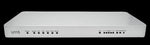

AT&T VPN GATEWAY U115 Power up with enterprise-level primary backup connectiviy
$199.00
AT&T VPN GATEWAY U115 Power up with enterprise-level primary backup connectiviy
Product Description


In many cases, a wired Ethernet connection will be provided by your ISP. This type of connection includes DSL, Cable and Managed Internet Connections.
Once an Internet Connection has been established, the U115 will try to retrieve its configuration from the network, and if successful, may perform an automatic reboot to pick up the new configuration. This should occur within the first 2-3 minutes after initial power on. Wait for a steady GREEN ONLINE light on the front panel to indicate the U115 is ready for use.
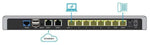
Basic connectivity is shown in the diagram above. Devices in the local network are connected to one or more of the LAN ports on the back of the U115; the broadband connection is usually established via the WAN1 port.
Use a straight-through Ethernet cable (usually provided by your Broadband Internet Service Provider) to connect your Internet broadband interface device to the Ethernet port labeled WAN1 on the U115. The U115 should be connected directly to the broadband interface device.
Dynamic Host Control Protocol (DHCP) is the default configuration for Internet IP addressing of the U115 Internet network interface. If your device automatically obtains an address from your ISP through DHCP, it should auto-configure shortly after powering up.
If your Broadband Internet Service Provider supplied you with a static IP address or PPPoE account information for use with your broadband connection, you should and select either "Static" or PPPoE when answering the question “HOW DO YOU WANT YOUR AT&T U115 TO RECEIVE IP ADDRESSES”.
ITEMS ISSUE
Shipping
Please kindly message us before leaving feedback if you got any problems.thank you
We offer FREE shipping on all orders!
Your order will be dispatched within 1 working day of receiving payment (Monday-Friday) and you should expect to receive it a few days after dispatch
In the very unlikely event that your item is lost or damaged during post, then WE are responsible and will issue either a full refund or replacement.
RETURNS
If you are not 100% satisfied with your purchase, you can return the product and get a full refund or exchange the product for another one, be it similar or not.
You can return a product for up to 60 days from the date you purchased it.
Any product you return must be in the same condition you received it and in the original packaging. Please keep the receipt.


In many cases, a wired Ethernet connection will be provided by your ISP. This type of connection includes DSL, Cable and Managed Internet Connections.
Once an Internet Connection has been established, the U115 will try to retrieve its configuration from the network, and if successful, may perform an automatic reboot to pick up the new configuration. This should occur within the first 2-3 minutes after initial power on. Wait for a steady GREEN ONLINE light on the front panel to indicate the U115 is ready for use.
Basic connectivity is shown in the diagram above. Devices in the local network are connected to one or more of the LAN ports on the back of the U115; the broadband connection is usually established via the WAN1 port.
Use a straight-through Ethernet cable (usually provided by your Broadband Internet Service Provider) to connect your Internet broadband interface device to the Ethernet port labeled WAN1 on the U115. The U115 should be connected directly to the broadband interface device.
Dynamic Host Control Protocol (DHCP) is the default configuration for Internet IP addressing of the U115 Internet network interface. If your device automatically obtains an address from your ISP through DHCP, it should auto-configure shortly after powering up.
If your Broadband Internet Service Provider supplied you with a static IP address or PPPoE account information for use with your broadband connection, you should and select either "Static" or PPPoE when answering the question “HOW DO YOU WANT YOUR AT&T U115 TO RECEIVE IP ADDRESSES”.
ITEMS ISSUE
Please kindly message us before leaving feedback if you got any problems.thank you
Shipping
We offer FREE shipping on all orders!
Your order will be dispatched within 1 working day of receiving payment (Monday-Friday) and you should expect to receive it a few days after dispatch
In the very unlikely event that your item is lost or damaged during post, then WE are responsible and will issue either a full refund or replacement.
RETURNS
If you are not 100% satisfied with your purchase, you can return the product and get a full refund or exchange the product for another one, be it similar or not.
You can return a product for up to 60 days from the date you purchased it.
Any product you return must be in the same condition you received it and in the original packaging. Please keep the receipt.

Shipping & Returns
DELIVERY
- Dispatch: Within 24 Hours
- Free shipping across all products on a minimum purchase of $50.
- International delivery time - 7-10 business days
- Cash on delivery might be available
- Easy 30 days returns and exchanges
RETURNS
If you do not like the product you can return it within 15 days - no questions asked. This excludes bodysuits, swimwear and clearance sale items.
We have an easy and hassle free return policy. Please look at our Delivery & Returns section for further information.
Product Reviews
General Tab
Please take our customers reviews as reference to help you make an informed purchase decision